
Address Autocomplete | What It Is & How to Use It
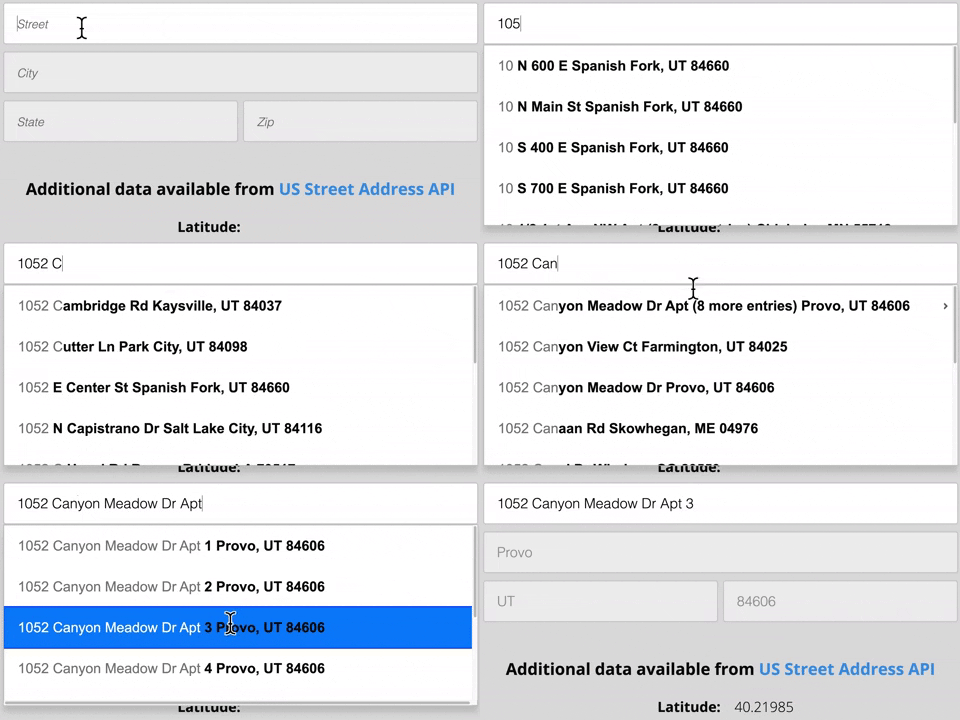
Address Autocomplete is an address form checkout feature that automatically suggests street addresses during user entry. Autocomplete functionality can reduce keystrokes, typos, & incomplete addresses at the point of entry while improving the user experience, address reliability, & conversion rates.
An Address Autocomplete API is an application programming interface (API) that provides programmers with options for type-ahead search functionality inside their applications. The API provides real-time address predictions with each keystroke because the program sends queries while the user enters an address.
Smarty has an address autocomplete API for US addresses and another for international addresses. You can try our user-facing and API demos for each here, or keep reading to learn more about address autocomplete.
| US Address Autocomplete | International Address Autocomplete | See the Documentation |
|---|---|---|
In this article, we'll discuss:
- What Is Address Autocomplete?
- 6 Considerations for Developers Who Use an Autocomplete API
- Best Address Autocomplete API Providers
- Autocomplete API Example
- Autocomplete Cost
- International Address Autocomplete
- Conclusion
What Is Address Autocomplete?
As mentioned, 'Address Autocomplete' is an application feature that suggests street addresses as a user is typing. When implemented correctly, autocomplete can:
- Simplify the checkout process by eliminating keystrokes for shipping and billing information.
- Reduce cart abandonment rates by minimizing shopper fatigue.
- Eliminate typographical errors.
- Standardize addresses to the local postal authority format.
- Validate that an address is real and mailable.
- Enhance address data quality by limiting invalid entries.
6 Considerations for Developers Who Use an Autocomplete API
So, you've decided to use an address autocomplete API in your website or project. Great choice.
No developer wants to get waist-deep in a project before realizing their API choice doesn't meet their needs. This section will cover key considerations to remember as you vet solutions. Using these suggestions, you'll be better equipped to find the right API.
While every user's needs are different, there are some common features that most people need when using an autocomplete tool. Here are 6 important considerations when selecting an autocomplete API:
- Geolocation
- Secondary Unit Designators (Apartments Numbers)
- PO Boxes, APOs, FPO, DPOs
- Standardization & Validation
- Providing Only Real Addresses
- Includes Non-Postal Addresses
You might also want to read our ebook. It shows a new approach to address autocomplete that speeds up accurate address entry, by allowing users to select the right address without entering a single keystroke. Read it now:

Consideration #1: Geolocation
Autocompletion's universal goal is to make entering an address quick and accurate. One way to do this is by using an autocomplete tool that has a geolocation feature. A geolocation feature will approximate the location of the user based on their IP address.
The autocomplete tool can prioritize addresses closest to the user's location first, and expands if the nearest suggestions aren't selected.
Suggesting addresses close to a user's location help them choose the correct address faster. Using an address autocomplete API that can't geolocate, requires users to enter more characters to find the correct address.
And of course, each unnecessary keystroke adds time to form completion, increases typo probability, and makes form abandonment more likely.
Here's an example of why using an address autocomplete with a geolocation feature is important.
In the US, hundreds of thousands of addresses contain “151”.
Within a state, thousands of addresses contain “151”.
However, within a city, only a handful of addresses may contain “151”.
So, imagine a user is typing an address into your form, and the autocomplete API you've selected can geolocate the user. The autocomplete software takes note of the user's IP. When the user enters “151”, the API returns addresses containing “151”, sorted by closest first.
Often, users will see and select the correct address suggested within only 4 to 5 keystrokes, compared to 40-50 characters required to enter a typical US address manually.
Consideration #2: Secondary Unit Designators (Apartments Numbers)
Many autocomplete tools will provide you with the primary address of a location. But, they may not provide you with the secondary address. That means it might suggest the address of an apartment building, business complex, or manufactured home park, but won't suggest a specific apartment, suite, or unit number of the user's front door.
An API that suggests and completes the secondary address helps to prevent forgotten, incorrect, and typoed unit numbers. Autocompleting the secondary also reduces lost and returned mail and helps to block flawed or incomplete addresses from entering your system.
A question worth asking is, “Do you need front door accuracy or ballpark accuracy from your API?” If your application just needs to estimate a user's address to find their distance to the closest National Park, then ballpark accuracy is probably acceptable.
However, if you need to verify a user's unit number to send mail, deliver food, perform maintenance work, or provide accurate homeowner's insurance quotes, you'll need “front door” accuracy.
Here's an example. Suppose a user enters their address as:
233 S Wacker Dr
and the auto-complete address API returned the following suggestion:

The suggested address looks like a good address, right? In this case, you'd probably be wrong. Incidentally, the address in question is the Willis Tower (formerly known as ‘The Sears Tower'), the tallest building in the United States until 2013. This street address has the following valid mailing address types:
- 6 addresses for floors
- 284 addresses for suites
- 598 addresses for units
- 9 addresses for the lobby

800 valid secondary delivery points in one building combined with an order form using an autocomplete API that DOESN'T suggest secondaries, can lead to big problems. It means that your customer in unit 6083 forgets to add his unit number, never gets his inflatable cat unicorn horn, and leaves you a 1-star review. With nearly 1/4th of addresses in the US containing apartment, unit, suite, and other secondary numbers, it's something that shouldn't be ignored.
Unfortunately, many autocomplete API providers don't suggest apartment numbers. They only provide street-level or house-number-level addresses.
Don't let inadequate considerations for unit numbers be the “gotcha” moment that sends you back to square one. Test out some apartment numbers on the API you plan to use before you commit.
Consideration #3: PO Boxes, APOs, FPO, DPOs.
An extension of the issue with Secondary Unit Designators is how an autocomplete API handles PO Boxes (POBs), Army Post Offices, (APOs), Fleet Post Offices (FPOs), and Diplomat Post Offices (DPOs). Because there are 21 million PO Boxes in the US, how an autocomplete api tool handles this issue can be a big deal.
Unfortunately, many providers stop offering suggestions after a user types in a PO Box number. It is the digital equivalent of saying, “Don't touch me with that hot garbage”. Since many entry-level autocomplete providers are mapping companies, they're less concerned with all the mailing points to which a customer might want to ship.
If correctly handling all types of secondary unit designators is important to you, we recommend that you test any prospective autocomplete API with some sample addresses that include PO Boxes, APOs, FPOs and DPOs.
Consideration #4: Standardization & Validation
Another important issue to consider when evaluating an autocomplete address API is whether it standardizes and validates addresses according to the official postal format.
Take this example:
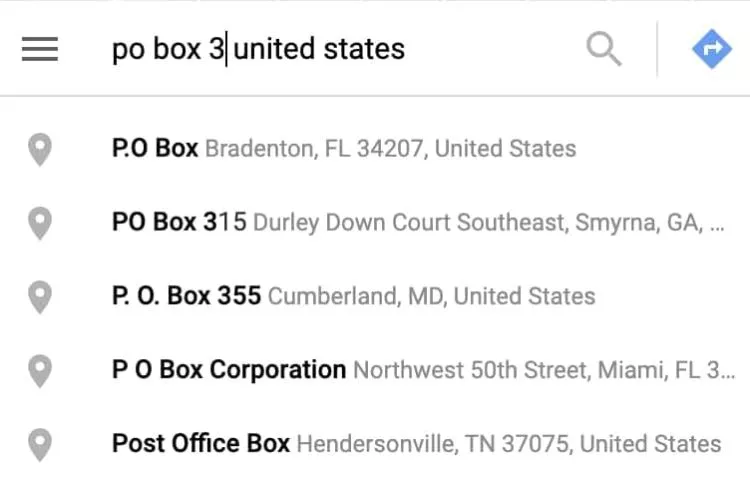
In this example, you'll notice that we have 5 PO Boxes coming back from a commonly-used address autocomplete provider. Out of the 5 suggestions, none of the addresses are returned using the same format.
Shipping or mailing to the suggested addresses could result in delivery delays. It could also result in returned or lost packages.
Take a counter example from another provider:

The addresses shown are all in a standard format and are valid PO Boxes.
Using a service that standardizes and validates addresses will simplify your life and give your users a better overall experience.
Consideration #5: Providing Only Real Addresses
You would think that if you are using an address autocomplete API, that the provider would ensure all the addresses in their database are real shipping addresses. Right? Unfortunately, that's often not the case. Many providers will auto-complete addresses based on where an address would hypothetically be located - if it did exist.
Here is an easy way to understand and test this with a provider. Simply take a street address you know is real, and alter the building number by one digit and see if the provider's tool shows that ‘fake' address as a suggested ‘real' address.
For example, here is a valid address:
30 Knole Lane
Dennis MA 02638-2009
But let's say, the user's finger slips and accidentally hits the “4” key, instead of the “3” and now the address is entered as 40 Knole Lane. The problem is this new address doesn't really exist. In reality, there are only 2 valid street addresses on Knole Lane in Dennis, MA.
The two house numbers that actually exist on this street are house number 30 and house number 33. Many address autocomplete tools ignore the house number. As a result, they won't correct that part of the address and will still display that as a valid option like this:

Now, the tool fails to suggest a real address and falsely suggests an address that doesn't really exist.
Consideration #6: Includes Non-Postal Addresses
A "non-postal" address in the United States is a real street address that is not included in the USPS address database. Non-postals include but are not limited to:
- Rural areas where mail delivery isn't financially feasible for the USPS.
- locations where inclement weather doesn't permit USPS delivery.
- New construction that has not yet been added to the USPS database.
While USPS doesn't deliver to these addresses, shippers like FedEx and UPS are happy to pick up the slack. There are currently millions of valid addresses that are "non-postals" by the USPS standards.
With the growing demand for data quality, Address autocomplete software that relies exclusively on the USPS address database is no longer sufficient. The best address validation in the United States starts with a reliable address database and also includes addresses from additional RELIABLE data sources in order to provide a more comprehensive dataset.
Smarty's US database is compiled from only authoritative sources, has 193+ million addresses, and is also offered as a comprehensive US address list. Address lists by state are also available.
Really, just stay away from autocomplete address API providers that use crowd sourcing for address data, as it's' prone to error.
Best Address Autocomplete API Providers
Now that we have discussed 6 things to consider when deciding on the best address autocomplete API provider, we will cover some of the more popular services in the market. We will discuss 3 APIs and then give you a comparison summary table:
- Google Places Autocomplete API
- Algolia Address Autocomplete API
- Smarty US Autocomplete Pro API
- Service Provider Comparison
Each of these has its strengths. So, comparing their offerings to your needs is the next step in the evaluation process. Let's discuss how each provider stacks up to the 6 Autocomplete API Considerations we outlined above.
Google Places Autocomplete API
Want to see a head-to-head comparison between Google and Smarty? Check out our Google Address Autocomplete versus Smarty comparison.
Google Maps and Google Places are both a pretty big deal. Because they do places, it isn't surprising that they provide the Google Places autocomplete API.
The Google Places library has the most complete set of worldwide public business listings. The Google API provides data from over 200 countries and territories. They also have volunteers that submit data for location data via their Local Guides program. But, how does their API measure up to the 6 considerations we discussed earlier? Here is how they stack up.
Geolocation
✅ Google's Autocomplete API returns address suggestions faster by starting with the geolocation of the user. It is important to note here that while Google’s autocomplete API increases the speed of address entry, it doesn't guarantee the validity of your addresses. In fact, Google says it best: “By comparison, Autocomplete is a type ahead solution that helps with speeding up address entry, but in prioritizing the user’s entry experience doesn't guarantee validity of the addresses. Address Validation can be used afterwards to catch incorrect or missing components…” - Google
Secondary Unit Designators
❌ Google doesn't suggest apartments, units, suites, floors, or any other secondary unit indicators with their auto-completed addresses. Also, Google's API does not check to make sure that a unit number that is typed into their tool is valid.
To Google, Platform 9¾ may as well not exist.
Consider this. Based on our most recent count, there are 181 million mailing addresses in the US. Of those, 44,937,008 contain secondary address indicators. This means almost a fourth of users in the US would need to enter the apartment number manually into Google's tool. And half of the users might just forget altogether.
Standardizing & Validation
❌ Google does standardize and validates addresses, but not through their address autocomplete API. Even still, their address validation product is far from perfect. If your business incorporates shipping, delivery or needs real shipping addresses for any reason, Google may end up giving you a hit-or-miss result.
If you’re hoping for a list of specific areas, you’re in luck. Google’s address validation features:
- Inconsistent address parsing
- Hit or miss RDI data
- Extremely restrictive address storage terms
- Bulk validation is cumbersome
- Slow and limited API
- Invalid output suggestion from autocomplete
- Strict attribution requirements
- Lackluster customer support
- High-risk of false positives
- Limited country coverage
Check out this article for more in-depth coverage of Google’s address validation product.
The worst part about all this is that if you’re currently using Google’s autocomplete feature there’s no validation occurring. So, in order to validate a customer’s address, your users will need to run their address through Google’s autocomplete API, then they’ll need to run that through Google’s validation API as well. Talk about killing one bird with 2 stones.
Much of the data that Google aggregates comes from volunteers. They can report problems with streets, businesses, residential addresses and add new locations. Google doesn't require address standardization training, so data accuracy varies widely.
Take something as simple as a post office box.
Here is an autocomplete Google Places example without a map:

We have 4 suggestions and 3 formats for “PO Box” and only one is in the correct standardized format. To be fair, Google doesn't do PO Box data either, but it does show the random formats.
PO Boxes, APOs, FPO, DPOs.
❌ Google does not support auto-complete address suggestions for any form of Post Office boxes.
Provides Only Real Addresses
❌ Sadly, Google suggests fake addresses. They take the house or building number at face value and assume the user hasn't made a mistake typing. Google makes no attempt at correction. Considering that a single street can have thousands of valid shipping addresses, this can make actually finding an address suggested by Google, impossible.
Consider this example: James Smith in unit 6083 of Willis Tower is trying to order his inflatable cat unicorn horn again after his first order got lost in the mail.
He wants to put in his valid address:
233 S Wacker Dr Chicago, IL
But his hairless sphinx Princess Celestia walks across his keyboard.
As a result, he enters an entirely invalid address like this:

And Google displays it as a valid suggestion. James doesn't realize what is going on and clicks the result.
Now, you might say “Well, since Google validates the apartment number, the invalid address will get kicked out as soon as the user adds the apartment number. Right?”
And to that I would respond, “Remember, Google doesn't validate apartment numbers. Seriously. We just barely covered this!” Then, I would tell you to “Read the Secondary Unit Designators section of this article again”.
That unicorn horn is as good as lost all over again. Princess Celestia is going to be inconsolable.
Includes Non-Postal Addresses
✅ Yes, Google includes non-postal addresses which increases the volume of addresses in their database. Yay! Now, for the downside. The addresses are often not reliable. The Google address autocomplete API allows untrained volunteers to add residential and business addresses to their database. As a result, it is easy to find duplicate and erroneous addresses inside Google's address system.
Special Considerations
There are some additional items you should be aware of when considering using Google's autocomplete tool. Google's Terms of Service requires you to put the autocomplete form on a public page. So, if you need to auto-complete addresses behind a login page or on an internal form, you might run into problems.
As a final note, even though it is not called the “Google Maps autocomplete”; Google still requires you to use their autocomplete API with a Google map. The other option is to display their “Powered by Google” branding.

So, if that is a deal-breaker, it is time to look at the next provider.
Algolia Address Autocomplete API
The Algolia community has created an open source project for address autocomplete. To do this, they have leveraged the open source database of OpenStreetMaps. With Algolia, you get an open-source based tool, at a price. This makes for an enormous data library that rivals Google and can be useful for international addresses and landmarks. So, how does Algolia measure up to our 6 considerations?
Geolocation
❌ The Algolia address autofill API doesn't use geolocation. It starts making suggestions from the first keystroke, but it doesn't use geolocation to determine which suggestions to display. As a result, users will see addresses from all over the world.
This requires users to enter more keystrokes on average to get the correct address. Let's say a user wants to enter an address into an application using the Algolia autocomplete API.
The user starts typing this address:
863 South 770 East
Spanish Fork, UT
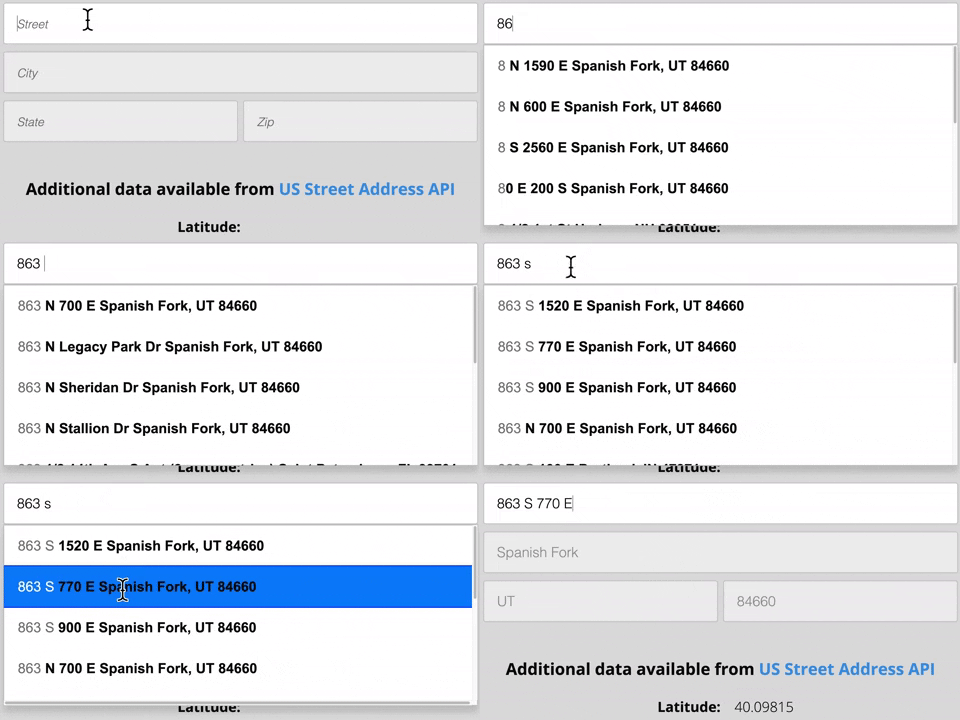
Algolia ignores the house number. As a result, we have to enter 5 keystrokes before we even start getting results in the right state. And after 13 keystrokes, the user's address still isn't displayed as an option.

This is fine if a user is using autocomplete to just display a city name. But, if you need to get a specific address, other providers will display it in fewer keystrokes than Algolia does.
Secondary Unit Designators
❌ Algolia's autocomplete doesn't display apartment numbers. If a user starts to type an apartment number, the tool gets confused and starts serving less accurate information. You're forced into a suboptimal solution such as adding an extra unit number box that may be forgotten.
PO Boxes, APOs, FPO, DPOs.
❌ In reality, Algolia is primarily a mapping API. This open-source project won't populate results with post office box information of any kind.
Standardizing & Validation
❌ Algolia is not an address validation company and all of their data comes from volunteers. They are happy to take whatever information they can get, and from wherever they can. So, you run into the same issues as with Google's address autofill API. Both of them will provide you with inconsistent and invalid information.
Provides Only Real Addresses
❌ Algolia will suggest fake addresses as a user is typing. Similar to Google's API, Algolia assumes the user isn't entering a typo when they enter a house number. Algolia considers any house number a user enters as valid. They'll predict results based on the rest of the street address. Here is a screenshot where Algolia predicts 5 addresses and not one of them are real addresses.

In reality, No address in the city of Spanish Fork contains the sequence “8632”.
Includes Non-Postal Addresses
✅ Like Google, Algolia includes non-postal addresses in their database. Also like Google, Algolia allows volunteers to both add addresses to the system and relies on volunteers to review submitted addresses. Address data that originates from Algolia should not be considered reliable for address management or shipping purposes.
Algolia Places uses a huge database of information. Depending on your use case, what they offer can work extremely well. If you only need landmarks or ballpark accuracy for your application they can offer an inexpensive service that will get the job done. As long as you are looking for general information, Algolia does autocomplete really well. If you need front door accuracy, we suggest looking elsewhere.
Smarty US Autocomplete Pro API
Smarty has been in the address validation game for a decade, and recently released a new, beefy version of our Address US Autocomplete Pro API. This API is front-door accurate, fast and reliable. So, how does the Smarty US Autocomplete API do with our 6 considerations? Let's find out.
Geolocation
✅ The Smarty US Autocomplete Pro API uses geolocation to return relevant results from the first keystroke. So, when a user types in “863” they are served with results that are near the city in which the user is located. Oftentimes, this results in the relevant address being suggested within the first 5-6 keystrokes of a user's search.
Check it out:
Secondary Unit Designators
✅ The Smarty US Autocomplete Pro API handles secondary unit designators. It uses the official USPS database for address suggestions. This means that if an address can get mail, it can be predicted with our API. Suggested addresses will display floor numbers, apartment numbers, unit numbers & suites in an easy-to-understand format. So, if a user types in the address of an apartment building, the Smarty autocomplete tool will also provide a list of unit numbers in that apartment building.
This is how Apartments work with our API:
Standardizing & Validation
✅ The Smarty US Autocomplete Pro API standardizes and validates addresses. Smarty is an address validation company. It would be pretty silly for us to not offer standardization and validation with our autocomplete API. And, all of our addresses are collected and updated by trained professionals.
Better yet, the database information is updated every month. Our results are always provided in the USPS standardized format. When coupled with our US Street Address API, we can also provide ZIP+4 Codes, and 45 points of metadata. None of the other providers mentioned in this article do that.
PO Boxes, APOs, FPO, DPOs.
✅ The Smarty US Autocomplete Pro API handles PO Boxes, APOs, FPOs and DPOs. Our address autocomplete API offers address suggestions for PO Boxes closest to the user and will also autocomplete any address that the USPS delivers to, including APOs, FPOs and DPOs.
Provides Only Real Addresses
✅ One advantage of the Smarty US Autocomplete Pro API is that it suggests ONLY valid addresses. Full Stop. No caveats or exceptions. A user must put in a valid house number in order to get their address to show up in the prediction list. The best place to make sure an address is correct is with the user themselves. There's no way a user can select an invalid address if they are using the Smarty US Autocomplete Pro API. This saves our users a lot of hassle in the long run.
Includes Non-Postal Addresses
✅ Yes, Smarty now includes non-postal addresses as a part of our address validation services as well as our address Autocomplete Pro API. We don't rely on volunteers or open-source projects for our address data, we only use thoroughly vetted, reliable sources.
We at Smarty have worked hard to make accuracy the number one priority of our US Autocomplete Pro API. This is achieved by geolocating and parsing the house number where other providers may ignore this. A lot of brain power has gone into how to handle apartment numbers and PO Boxes.
As a result, we frequently suggest the correct address in 4-6 keystrokes. Other providers require 10-13 or even more keystrokes before they suggest the correct address.
Finally, we have well-tested, open-source, and actively developed SDK packages available at no charge to make development easy. Your boss is gonna be so impressed.
We provide the following SDKs for integrating our address autocomplete API:
- iOS SDK Compatible with
- Objective-C
- Swift
- JavaScript SDK
- JAVA SDK Compatible with:
- Android Development
- Clojure
- Groovy
- Scala
- Kotlin
- … or any other JVM language.
Address Autocomplete Service Provider Comparison
What a ride! Here is a service comparison for each point we covered above and what each address autocomplete service offers:
* Provider relies wholly or partially on data from open-source projects or volunteers for non-postal addresses.
Address Autocomplete API Example
Here's a tutorial on how the Smarty US Autocomplete Pro API works in its intended context.
- A user starts typing their street address into the address form field.
- The tool starts by knowing roughly where the user is located. With each keystroke of input, the address autocomplete API free demo submits the provided text to the US Autocomplete API.
- The US Autocomplete API returns address suggestions taken from an index of house-number-street-city-state combinations and populates a dropdown right under the user's cursor.
- Once the user recognizes their address among the suggestions in the dropdown menu, they may select it.
You can experience the above behavior for yourself using the address autocomplete API free demo. You will be able to test the user experience. Below that, you will be able to create sample cURL requests to see the API response. And you can check out our autocomplete documentation for help with customizing your configuration.
Autocomplete Cost
Smarty's Autocomplete Pro is calculated by keystroke. Each keystroke counts as one lookup. On average, an address is found within 8-10 keystrokes.
Monthly plans start at 20 USD a month for 5000 lookups (0.004 USD per lookup) and range to 500 USD a month for 200,000 lookups (0.0025 per lookup).
Annual plans start at 200 USD a year for 60,000 lookups (0.0033 USD per lookup) and range to 5,000 a year for 2,400,000 lookups (0.0021 per lookup).
Unlimited plans start at 10,000 USD a year for unlimited lookups at a rate of up to 36,000 lookups/hour (0.00003 USD per lookup) and range to $50,000 a year for unlimited lookups with no rate limits.
Assuming an average of 10 keystrokes to find an address, the above monthly pricing ranges would yield a cost of 0.04 USD to 0.025 USD per auto-completion.
Other autocomplete APIs offer confusing prices. This makes it difficult to determine the actual cost until after you have signed up. Not knowing your price until after you have enrolled can be costly. A company who selected our 25,000 USD annual unlimited plan reported that they were paying over $300,000 a year previously for Google's autocomplete.
We strive to make our pricing easy to understand. See the pricing page for additional details.
International Address Autocomplete API
A universally accepted address format doesn't exist. The differences between address formats are frequently substantial, and they can play a huge role in address data quality and shipping. International Address Autocomplete is priced per address selected, not per keystroke.
International address autocomplete is the process of predicting global addresses in real-time while the user types. Global address autocomplete can be a complicated process because addresses must conform to the unique language, character sets and addressing standards of local postal authorities worldwide in a process called transliteration.
API Providers like Algolia and Google Maps were designed with maps and navigation in mind. Since these providers rely on crowdsourced contributions, they frequently lack high precision. They are great for getting to the Eiffel tower but not great for finding the exact address of the customer.
Available address data quality varies widely by country. At a minimum, any international address autocomplete used for address validation should provide:
- Global autocomplete based on country selection or geolocation biasing.
- Full Unicode support so that users can search and see address predictions in their native language and character set.
- Predictions that contain the most up to date and highest-quality data available.
- The address should also be served in a standardized format.
API Providers that fail in any of these areas should not be considered a viable solution for any address forms.
International Autocomplete is priced per address selected, not per keystroke. See the pricing page for additional details.
Conclusion
You are now armed with a checklist to aid you in your quest of finding the right autocomplete API for your project. In summary, you want an autocomplete API that:
▢ Geolocates the user to improve address predictions
▢ Provides data on secondary unit numbers
▢ Handles PO Boxes, APOs, FPOs
▢ Standardizes the address
▢ Validates the address
▢ Prevents users from entering fake house numbers
▢ Includes vetted non-postal addresses
▢ Provides global addresses autocompletion
As you've seen, there's one API that checks all the above boxes. Try it out here and then, when you're ready, check out our API pricing page and get signed up for an account. You can also chat with our super helpful enterprise team if you're ready to go straight to the big leagues.
You should also check out our address autocomplete ebook for more information and API implementation tips.