
Improve Delivery, Data & Brand by Validating Addresses




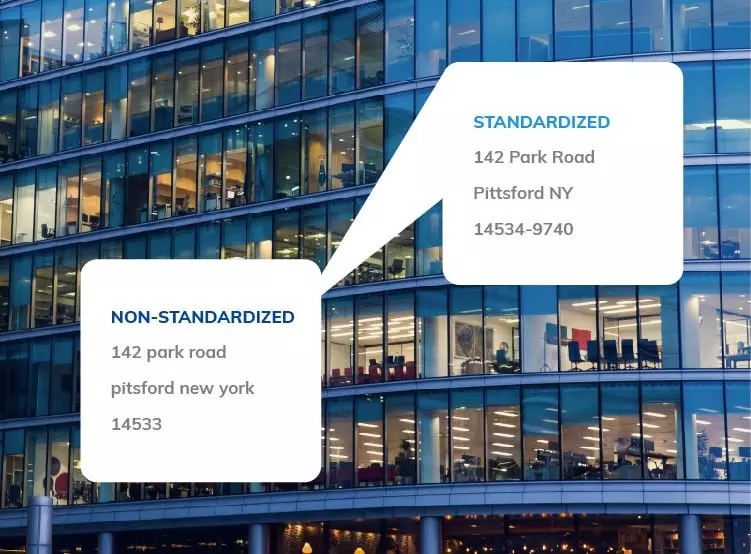


How Address Verification/Validation Works
 Parse
ParseIdentifies address components and parses into respective fields
 Standardize
Organizes the fields per USPS guidelines
 Verify
Validates that the address is deliverable
 Enrich
Attaches metadata, like geocodes, ZIP+4 Code, and congressional district to postal addresses

US Address Verification Demo with Enhanced Matching
Awaiting input
Enter an address in the address form on this page to see your results here
Predicted address suggestions powered by US Autocomplete Pro Api and International Address Autocomplete API.
Address validation powered by US Street Address API and International Street Address API.
Rooftop Geocodes powered by US Street Address API.



Ludicrously Lightning Fast and Reliable Address Verification API

Intelligently architected infrastructure can speedily process insanely massive databases, including yours.
No really. Speed is our specialty. If you need super-fast throughput we’ll help you work out an optimal mix of speed and cost for your business requirements.
3 levels of redundancy. Smarty is proud to fully disclose and publish our system performance. No secrets here. Check it out.

Results that are right on the money! If Smarty can’t 100% validate an address, we’ll give you full disclosure on the part of the address in question.
Smarty’s Enhanced Matching deciphers, matches, and corrects even the wonkiest of wrong addresses to help you reduce costly manual exceptions. See how it works in the free, customer-facing demo. Also, see the developer demo.
Your developers will praise your name after experiencing Smarty’s world-class documentation. You’ll be up and running quickly and easily.
Enhance Your Address Data

Smarty is CASS certified and validates all USPS addresses plus 20 million more non-postal addresses - 210+ million in all.
Improve your accuracy in deliverability by verifying apartment and suite numbers. Go beyond preconceived notions that verification is reserved for only the primary information - verify ALL address components.
Enrich your addresses with Smarty metadata including ZIP 9 geocodes and vacancy status to help you improve analysis and decision-making. Rooftop Accurate Geocoding is also available. Address verification metadata includes:
- Longitude
- Latitude
- RDI (residential/commercial)
- Vacant
- County name
- Congressional district
- Candidate index
- LACSlink indicator
- LACSlink code
- Street predirection
- Input index
- Street name
- Primary number
- City
- Precision
- Delivery point
- PMB number
- Time zone
- ZIP+4 Code
- State
- County FIPS
- Footnotes
- ZIP Code
- EWS match
- Active
- County route
- CMRA
- UTC offset
- Street suffix
- Delivery point
- Record type
- Delivery line 1
- Urbanization
- Observes DST
- DPV™ footnotes
- DPV™ match code
- PMB designator
- Secondary number
- Street postdirection
- Congressional district
- Secondary designator
- Delivery point barcode
- Building default indicator
- Delivery point check digit


Easy Address API Implementation & Legendary Support

Your development team will feel like wizards with how quickly they'll be able to implement US Address Verification. Smarty's world-class documentation covers everything your developers need. Smarty provides APIs and SDKs built by developers for developers.
Our terms and conditions are straightforward and easy to understand, and we try to keep revisions to a minimum.
When you reach out to our Support Team, they answer promptly. It's that simple. And Smarty's Support Team is made up of knowledgeable experts — no novices, no tiers, and no time-wasting scripts. Try us and we think you'll agree our unlimited, no-cost support is better than other companies' paid support.

Industry Leading Value with Simple and Transparent Pricing
Get straightforward pricing with no setup fees, commitments, or gimmicks. You can choose from flexible plans, including unlimited processing. Smarty’s industry-leading value improves your bottom line with no hidden fees or unwelcome surprises.

How Others Are Using Smarty

Boost Delivery Success
Boost accurate delivery by validating addresses prior to shipping to reduce accidental errors and increase customer retention and lifetime value. Read case study.

Clean Your Data
Get standardized, cleaned addresses to make deduplicating and merging records in your database a breeze. Read case study.
FAQ